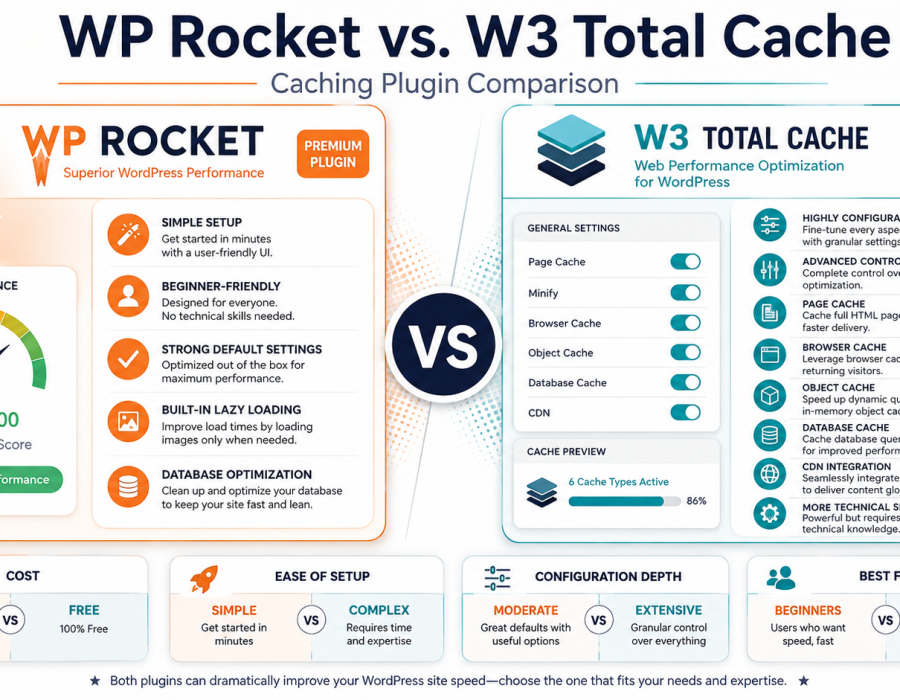
In our caching setup guide, we covered how caching works and why it matters for speed. WP Rocket and W3 Total Cache are two of the most established caching plugins for WordPress, taking noticeably different approaches — one premium and simplicity-focused, the other free and highly configurable. This guide compares them directly.
Here is how it works and how you can apply it.
The Core Distinction
- WP Rocket is a premium plugin (paid from the start, no free tier) built around simplicity — strong default settings that work well with minimal configuration.
- W3 Total Cache is a free plugin offering extensive configuration options, giving experienced users deep control over every aspect of caching behavior.
This mirrors a broader pattern seen throughout WordPress’s plugin ecosystem: paid tools often trade cost for simplicity, while free tools often trade simplicity for depth of control.
WP Rocket
- Strengths: Works effectively with minimal configuration required, thanks to well-chosen default settings; includes several performance features such as lazy loading and database optimization built into a single plugin rather than requiring several separate tools; generally considered more beginner-accessible.
- Trade-offs: No free tier — it’s a paid plugin from the outset; less granular manual control compared to W3 Total Cache’s extensive settings, which some advanced users may find limiting for highly specific configurations.
- Best for: Users who want strong performance results without needing to understand every caching setting in depth, and who are comfortable with a paid tool.
W3 Total Cache
- Strengths: Free to use, with a very extensive set of configuration options covering page caching, browser caching, object caching, database caching, and CDN integration; strong choice for users who want granular control over every performance setting.
- Trade-offs: The extensive configuration options can be genuinely overwhelming for beginners; achieving strong results typically requires more hands-on configuration than WP Rocket’s more automatic approach; misconfiguration is more likely given the sheer number of available settings.
- Best for: More technically confident users who want free, highly configurable caching and are willing to invest time in proper setup.
WP Rocket vs. W3 Total Cache: Side-by-Side Comparison
| Aspect | WP Rocket | W3 Total Cache |
|---|---|---|
| Cost | Paid only, no free tier | Free |
| Ease of setup | Simple, strong defaults | More complex, many configuration options |
| Configuration depth | Moderate, streamlined | Extensive, highly granular |
| Additional built-in features | Lazy loading, database optimization included | Available, though sometimes requiring more manual setup |
| Best suited for | Beginners and users wanting simplicity | Technically confident users wanting deep control |
This comparison reflects generally reported characteristics of each plugin. Specific features and pricing change over time and should be verified directly with each provider before deciding.
How to Choose Between Them
Ask yourself:
- Do you want strong results with minimal configuration, and are you comfortable paying for that convenience?WP Rocket is built specifically around this trade-off.
- Are you comfortable investing time into detailed configuration in exchange for a free tool?W3 Total Cache rewards that investment with a highly flexible, no-cost caching setup.
- Does your hosting provider already include built-in caching?As covered in our caching setup guide, some managed hosts include caching natively — check this before adding either plugin to avoid conflicts.
- How technically confident are you generally with WordPress plugin configuration?If you’re newer to WordPress performance tuning, WP Rocket’s simpler approach reduces the risk of misconfiguration.
Common Mistakes When Choosing a Caching Plugin
- Running both plugins simultaneously, or running either alongside hosting-level caching without checking compatibility. This commonly causes conflicts rather than compounded benefit, as covered in our caching guide.
- Choosing W3 Total Cache without budgeting time for proper configuration, resulting in suboptimal performance from default or poorly tuned settings.
- Assuming a premium plugin like WP Rocket guarantees better results automatically, when actual performance still depends on your broader setup — hosting, images, and plugin count, as covered in our speed optimization guide.
- Not testing the site thoroughly after configuring either plugin, missing display issues that occasionally result from aggressive caching settings.
Best Practices
- Check whether your hosting already includes caching before adding a separate plugin.
- If choosing W3 Total Cache, budget real time for careful configuration rather than assuming default settings alone deliver optimal results.
- If choosing WP Rocket, take advantage of its included features such as lazy loading and database optimization rather than running redundant separate plugins for the same functionality.
- Always test your site thoroughly after activating or reconfiguring either plugin, checking dynamic pages and forms specifically.
- Re-test your site’s speed after setup to confirm actual, measurable improvement.
Conclusion
WP Rocket and W3 Total Cache represent two different approaches to WordPress caching: WP Rocket trades cost for simplicity and strong defaults, while W3 Total Cache trades configuration complexity for being completely free and highly customizable.
Either can deliver strong performance results — the right choice depends on your budget, technical comfort, and how much time you’re willing to invest in configuration.
Leave a Reply
You must be logged in to post a comment.